
Setup guide
Set up your Shopify coupon list in three steps
Install and configure Coupon List Lite: select active Shopify discount codes, publish offer copy, enable the theme app embed, and test the cart popup.1. Select and explain your public offers
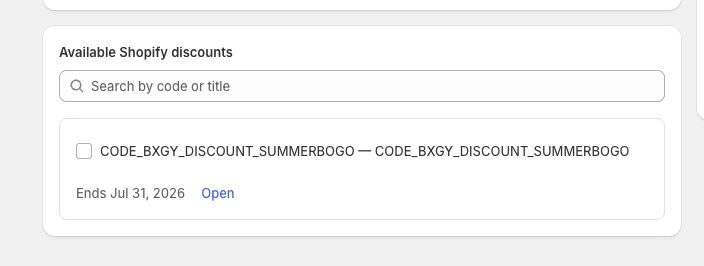
Install the app, open Available Shopify discounts, and add the active codes you want shoppers to discover. You can publish up to 10 offers.
Give every selection a public title and description. Keep the copy factual and mention the most important condition, such as a minimum order or eligible collection. Reorder the offers and disable any code that should remain configured but temporarily hidden.
2. Choose display and coupon behavior
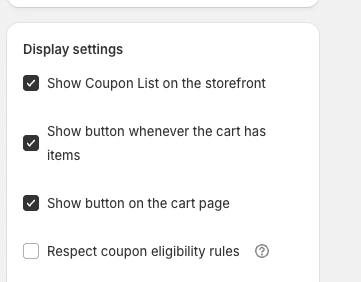
Enable the storefront list, then choose the cart journey where the offer button should appear. You can use the cart drawer, full cart page, or both.
- Enable Respect coupon eligibility rules to hide offers that cannot be confirmed for the current cart.
- Choose whether shoppers may select one coupon or up to two coupons.
- If one coupon is allowed, choose a checkout redirect or an explicit checkout button after successful application.
- Set the storefront button label, such as “Available offers.”
Click Save and publish in the app before opening the theme editor. Selecting offers or changing a setting does not publish the changes until you save them.
3. Enable the Shopify theme app embed
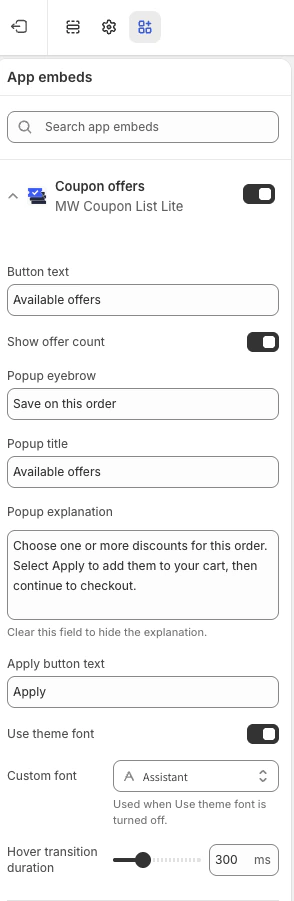
- Open your Shopify theme editor.
- Select App embeds.
- Enable Coupon offers.
- Review content, colors, typography, and button placement.
- Save the theme.
No theme-code edit is required. Start with the default floating button. Use the advanced cart-drawer selector only if you need the button mounted inside a specific theme element.
Test the complete shopper flow
- Add an eligible product to the cart.
- Open the cart page or cart drawer.
- Confirm the Available offers button is visible.
- Open the popup and review every title and condition.
- Apply each code and confirm Shopify's cart result.
- Test desktop and mobile layouts.
- Repeat with an ineligible cart.
If the widget is missing, confirm the app embed is enabled on the published theme, the list is enabled, at least one public offer is selected, and the cart contains an item. The support page contains additional checks.
Make active discounts easier to find