
Feature
Add a coupon popup to your Shopify cart drawer
Add a coupon offer popup to a Shopify cart drawer with a theme app embed, flexible button placement, and no theme code changes.Show offers without interrupting the storefront
Many Shopify themes let shoppers review the cart without visiting a separate cart page. Coupon List Lite can keep public promotions close to that moment by showing an offer button while the cart contains items. The button opens a focused popup instead of covering the store with a permanent promotion panel.
You can show the experience in the cart drawer, on the full cart page, or in both places. The same offer selection and Shopify rules apply in every placement.
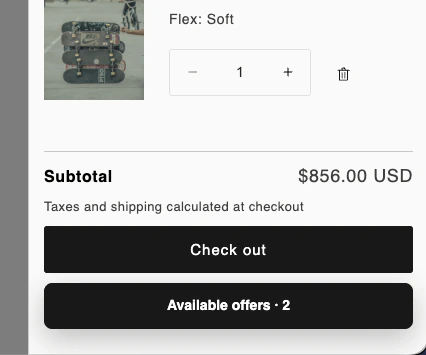
Start with the floating placement
Enable the theme app embed and test the default floating button first. You can choose its corner and adjust horizontal and vertical offsets. This approach is the most portable because it does not depend on a theme's internal cart-drawer markup.
Use embedded placement only when needed
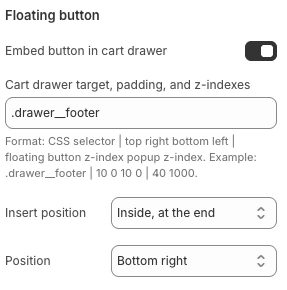
If the theme has a stable cart-drawer element, enable the embedded button and supply a CSS selector for that element. You can append or prepend the button inside the target, or place it immediately before or after the target.
- Open the cart drawer before inspecting its markup.
- Choose one stable and specific container.
- Test desktop and mobile widths.
- Retest after a theme update.
When the selector does not match, the regular floating button remains available. This fallback avoids making the offer list completely inaccessible because of a renamed theme class.
Match the popup to your theme
Theme-editor settings cover labels, offer count, colors, borders, corner radii, typography, hover states, and stacking levels. Start with defaults, confirm accessibility and visibility, then change only the styles your brand needs.
Make active discounts easier to find