
Product tour
See the coupon list your shoppers can use
Take a visual tour of Coupon List Lite: the cart offer button, available coupon popup, and controls for publishing selected Shopify discount codes.Follow the shopper journey
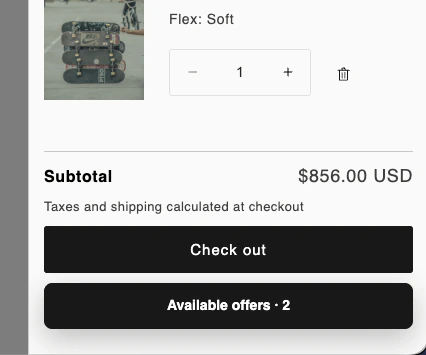
1. Find offers while reviewing the cart
The Available offers button opens the coupon list. You can use the default floating button or configure a theme-specific embedded placement. This example shows the button inside a cart drawer near the cart actions.
2. Review a coupon before applying it
The popup presents the selected codes, their public descriptions, and an Apply action. In your store, Shopify evaluates the code against the actual cart and customer. Configure one selection, or allow up to two when you have tested the intended combination.
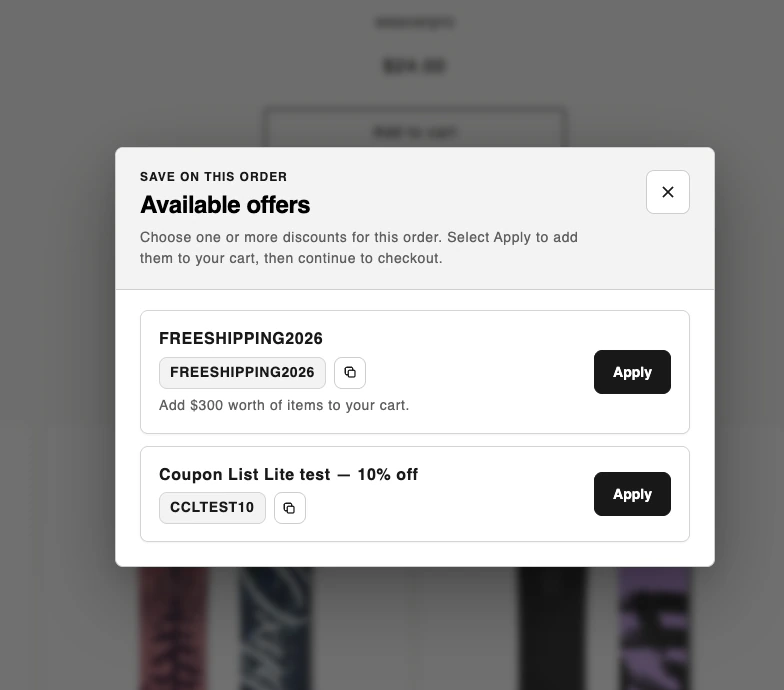
For shipping offers, confirm the delivery benefit at checkout. A visible coupon is not a promise that every cart or destination will qualify.
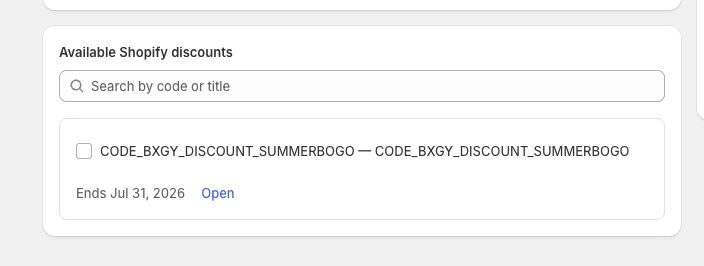
3. Choose what shoppers can discover
Create discounts in Shopify, then select the active public codes in Coupon List Lite. Add a title and description, arrange the list, and click Save and publish. You can publish up to 10 offers. Enable Coupon offers in the theme editor and save the theme to show the storefront experience.
Try it with your own campaign
Follow the setup guide and test an eligible cart before showing a promotion to shoppers. If you use Dawn, the theme setup checklist covers placement and acceptance checks.
Make active discounts easier to find